


SunPass
3.57.04K Reviews
App Specs
- Version
- 6.5.17
- Updated On
- License
- Free
- Downloads
- 1,000,000+
- Developer
- Florida's Turnpike Enterprise
- Categories
- Travel & Local
- Platform
- Android, iOS
Screenshots
 Analysis by AppCompare
If you're like me and constantly on the go in the Sunshine State, you know how frustrating it can be to deal with toll roads. Enter SunPass, Florida's go-to toll payment solution. I decided to give it a whirl and see if it truly lives up to its reputation. Here's how it fared.
Where the convenience first shows
For a driver who regularly uses Florida toll roads, the appeal is easy to understand: toll payments become part of an account routine instead of a repeated roadside chore. The app is a free travel and local tool from Florida's Turnpike Enterprise, and it is built around managing prepaid toll use. Its first-week value is less about novelty than about getting the account and vehicle details in order, then having one place to check on them.
That distinction matters. A visitor making one short trip may not want to spend time creating an account and learning a separate toll system. Someone who lives in Florida, drives across the state for work, or returns often is more likely to benefit from making that initial effort. I would treat setup as preparation for recurring journeys, not as a shortcut that makes every toll decision disappear.
In an ordinary weekday scenario, I might be driving to an appointment in another part of Florida and take a toll route because it suits the trip. The useful habit is to check the account before setting off, rather than trying to remember the balance only after several journeys. That small check can help me notice a low balance at a convenient moment and avoid turning account maintenance into a roadside distraction.
Setting Up SunPass: Quick and Painless
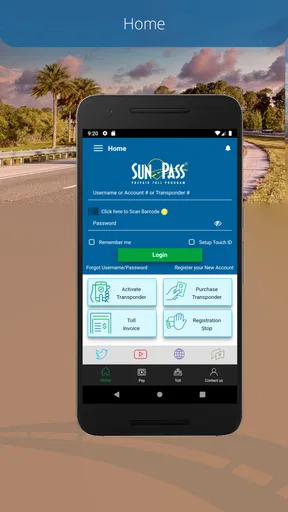
Getting started with SunPass was, thankfully, a breeze. The app is available for both Android and iOS, and downloading it was as simple as hitting the download button and watching it install in a flash. Once I opened it up, I was greeted with a clean and user-friendly interface, which is always a good sign.
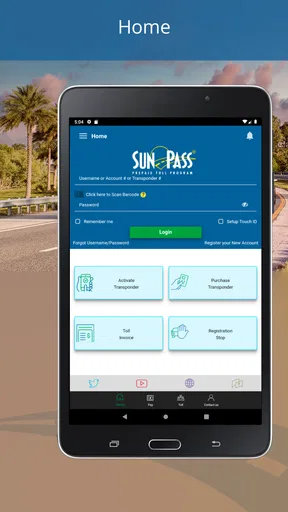
Registration was straightforward. I just had to input some basic info—name, address, vehicle details—and I was ready to roll. The app guides you through each step, and I didn't feel lost at any point. Kudos to the developers for making it so intuitive!
Features That Make Life Easier
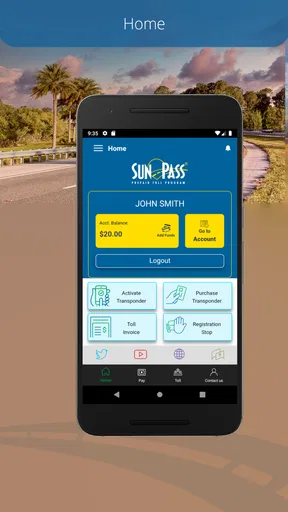
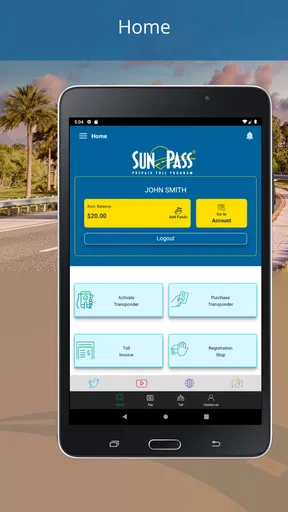
One thing I loved about the app was its real-time account management. I could easily check my balance, add funds, and even see my travel history. It's pretty neat to have all this information at your fingertips, especially if you're like me and forgetful about your toll balance.
Worth Reading Before You Choose

EA SPORTS FC Mobile 26 Is a Bigger Football Game, but It Takes Time

Flipboard Shows What News Apps Must Do Beyond the Feed

Switching to Android Auto Means Rethinking Your Driving Routine

Google Calendar Makes a Crowded Week Easier to Manage

Ludo King Makes the Most of the Minutes Between Plans

Baby Panda World Brings Quick Play to Modern Phones, but Its Game Library Feels Busy
The automatic replenishment feature is another lifesaver. You can set up your account to top up automatically when your balance runs low, which means no more scrambling to add funds last minute. It's little touches like this that make a big difference.
A routine that keeps the account useful
The less obvious benefit of seeing the balance and travel history together is that they support two different checks. Before a drive, the balance gives me a quick reason to act; afterward, the history helps me review what has been charged. I would use the history as a practical record, especially when several trips blur together, rather than relying on memory to reconstruct toll spending.
Automatic replenishment can reduce the need to remember every top-up, but it also makes the account less hands-off than it may sound. I would decide on a sensible funding routine, then occasionally review the balance and account activity so an automatic payment does not become invisible. If I prefer to control each payment manually, checking the balance before a planned drive is a reasonable alternative, though it asks for more attention.
For a household with more than one vehicle, I would take care to confirm the vehicle information during setup and revisit it when circumstances change. That is a general account-management habit, not a special convenience to assume away. Keeping the details accurate is part of making a prepaid toll arrangement dependable; the app cannot make a driver's account choices for them.
On the Road: How It Works
Using SunPass on the road was smooth sailing. Once your vehicle is registered, you zip through tolls without a second thought. The app's integration with SunPass transponders means you don't even need to pull out your phone. Just drive on through, and the app takes care of the rest.
The real-time notifications are super handy. I got alerts whenever I passed through a toll plaza, so I always knew where my money was going. It's a great way to keep track and ensure there are no unexpected surprises at the end of the month.
Choosing it over the usual alternatives
Compared with paying tolls one trip at a time or trying to handle each journey as a separate errand, a prepaid account is most useful when toll-road driving is a repeating part of life. I like that the app gives the account a place in my regular phone routine: check it when planning a drive, then look back at the activity if I need to understand a charge. That is a narrower purpose than a general navigation app, and it should not be confused with route planning.
Navigation apps can help me decide which road to take, while a toll account focuses on handling payment and account information. They solve different problems, so I would not replace a map app with this one. If I rarely drive in Florida or avoid toll roads, a navigation tool and occasional trip-specific payment choices may be enough; if I use Florida toll roads often, a dedicated prepaid account can be easier to maintain than repeatedly improvising.
One useful trade-off is commitment versus convenience. An account-based routine asks me to keep my details and balance in order, but in return I spend less mental energy on toll payments during regular driving. For an occasional visitor, that setup may feel like extra administration for little lasting benefit. For a local commuter or someone making frequent cross-state trips, it is more likely to earn a permanent place on the phone.
Customer Support: There When You Need It
No app is perfect, and sometimes things go awry. Thankfully, SunPass offers solid customer support. I had a minor hiccup with my account (my fault, oops), and reaching out to support was painless. They were responsive and had my issue sorted in no time. It's nice to know help is just a tap away.
What could become tiring over time
The ongoing burden is not usually opening the app every time I drive; the transponder-based arrangement is intended to let the vehicle pass through tolls without handling a phone on the road. The maintenance is in the background: keeping account and vehicle details current, noticing the balance, and choosing whether automatic replenishment suits me. Those tasks are manageable, but they are still tasks, and a driver who dislikes account upkeep may find the routine irritating after the initial convenience wears off.
Notifications can also be helpful without being essential to every driver. They offer visibility into toll activity, but anyone who prefers a quieter phone may not want every trip to prompt an alert. I would keep the account checks purposeful: use the balance before travel and the history when reviewing activity, rather than treating constant attention as necessary. The app is most valuable when it reduces uncertainty, not when it becomes another thing to monitor all day.
The app has a 3.8 average from around 17,000 ratings, which suggests a generally mixed rather than universally enthusiastic reception. I would take that as a reminder to judge it by the job I need done: convenient prepaid toll management is a practical benefit, but it does not make the entire driving experience effortless. SunPass has more than a million installs, is rated for everyone, and its current version is 6.5.17; those facts help identify the app, but the real question for me is whether toll account management is part of my regular routine.
Wrapping It Up: Is SunPass Worth It?
After giving SunPass a thorough test drive, I can confidently say it’s a must-have for anyone navigating Florida’s toll roads. The convenience, ease of use, and peace of mind it offers are well worth the download. Whether you're a local or just visiting, it simplifies your travels and lets you focus on the journey, not the tolls.
So, if you haven't given SunPass a shot yet, what are you waiting for? Go ahead, download it, and make your next trip a little less stressful. Happy travels!
Who should keep it installed
For me, the strongest case is a Florida driver who uses toll roads often enough that checking a prepaid balance and reviewing trip history are useful habits. It also makes sense for someone who wants a dedicated way to manage toll payments rather than relying on memory or treating each journey as a separate transaction. The app is free, so the decision is less about an upfront purchase and more about whether the account-management routine fits the way I drive.
I would skip it if I were making a single visit, driving only once on a toll road, or had no intention of using Florida toll roads regularly. In those situations, creating and maintaining an account may feel like unnecessary setup. I would also not expect it to answer every travel question: it is for toll account management, not a substitute for navigation or a reason by itself to choose one route over another.
My long-term verdict is that the app can earn lasting space when the toll system is part of a driver's normal Florida routine. The first-week convenience is easy to notice, but recurring value comes from a modest habit: keep the account details sound, check the balance at useful moments, and review activity when needed. If that habit saves me from repeatedly sorting out toll payments, I would keep it. If toll-road driving is rare, I would leave it off my phone until the need becomes regular.
Pros
- Easy account management via app.
- Quick toll payment processing.
- Real-time balance updates.
- User-friendly interface design.
- Supports multiple vehicle registration.
Cons
- Limited customer support options.
- Occasional login issues reported.
- No dark mode available.
- Some features require internet access.
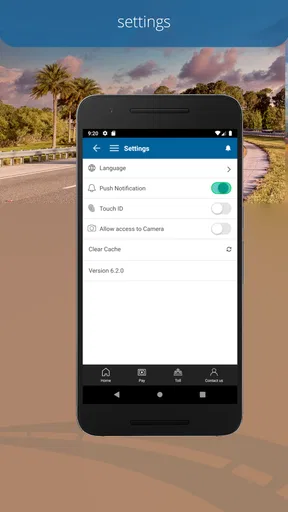
- Limited language options in app.
FAQs for SunPass
What is SunPass and how does it work?
SunPass is a prepaid toll program that allows drivers to pay tolls electronically on Florida's toll roads and bridges. By using a SunPass transponder, users can drive through toll lanes without stopping, as tolls are automatically deducted from their prepaid account. This system helps save time and reduces congestion at toll booths.
How do I set up and manage my SunPass account?
To set up a SunPass account, purchase a transponder online or at authorized retailers. Once you have the device, register it on the SunPass website or app by creating an account and linking a payment method. You can manage your account, check balance, add funds, and view toll history through the app or website.
What are the different types of SunPass transponders available?
SunPass offers two main types of transponders: the SunPass Mini and the SunPass PRO. The Mini is a smaller, sticker-type device for single vehicle use, while the PRO is a portable device that can be transferred between vehicles. The PRO also works in more states outside of Florida, offering greater flexibility for frequent travelers.
Are there any fees associated with using SunPass?
Yes, there are some fees associated with SunPass. The initial cost includes purchasing the transponder. Additionally, there may be service fees for maintaining the account, such as for account inactivity or insufficient balance. However, using SunPass generally offers discounted toll rates compared to cash payments, which can offset these costs.
What should I do if my SunPass transponder isn’t working?
If your SunPass transponder isn’t working, first ensure it’s correctly mounted on your vehicle’s windshield. Check your account balance to confirm there are sufficient funds. If issues persist, contact SunPass customer service for troubleshooting assistance or to request a replacement device. It’s important to address malfunctions promptly to avoid toll violations.


